Glass-box AI investigator for security alerts

Every verdict comes with the evidence.

Locard investigates each alert end to end across the SIEM, EDR, identity and threat-intel tools you already run. It cites the evidence behind every claim, waits for a person before it acts, and puts every step on the record, from the one-line glance down to each model and tool call.

  • Investigates end to end
  • Cites every claim
  • A human in the loop for actions
  • Every step, L0 to L5
The Locard mark drawn as an investigation: three pieces of evidence (E-2, E-7, E-5) are found along the trace, the verdict lands as Malicious at 97 percent confidence, and a password reset waits for a person to approve it. From the synthetic Example Corp case CASE-20417.
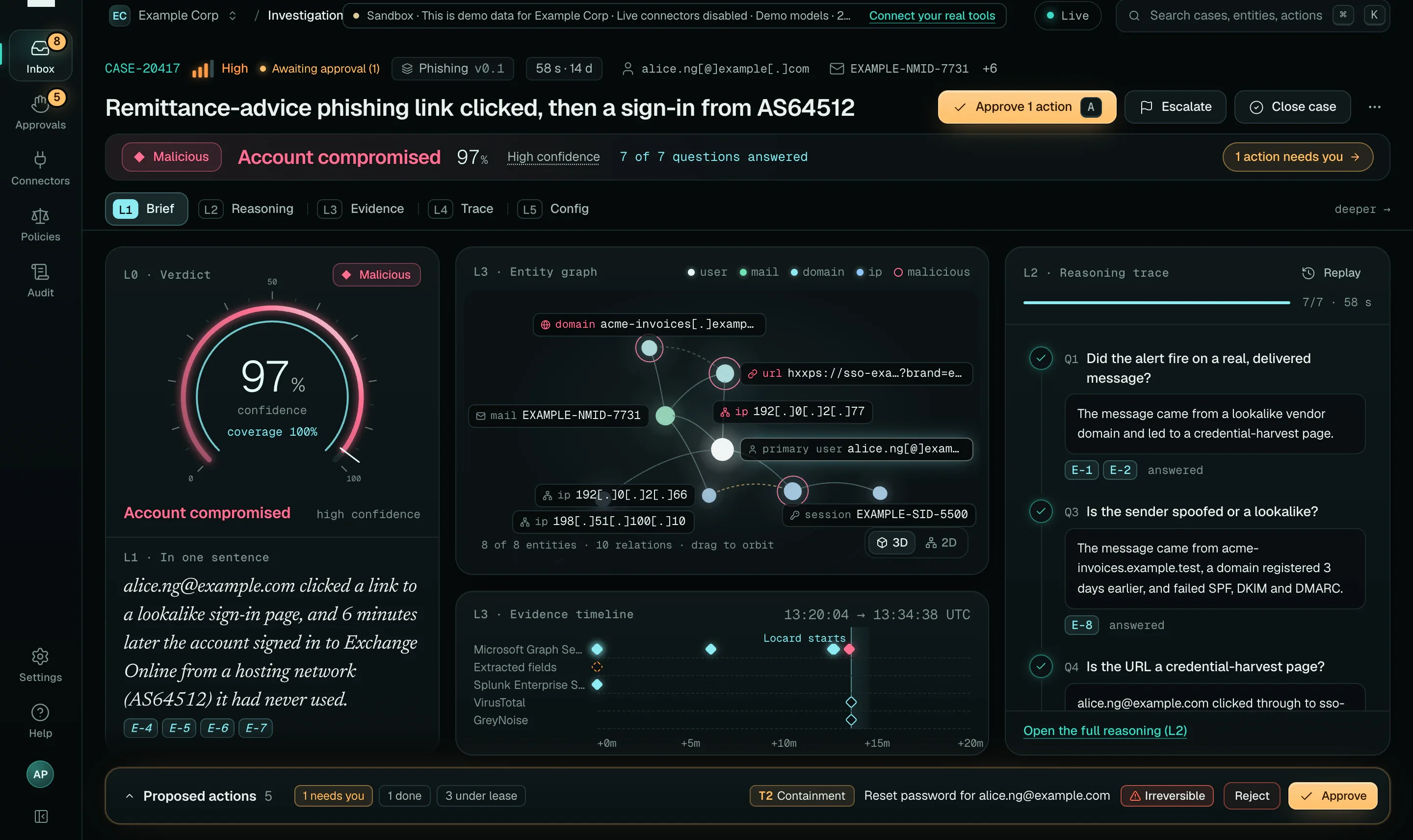
The Locard Investigation view for case CASE-20417, a phishing link followed by a sign-in from AS64512. A gauge shows Malicious at 97 percent confidence; an entity graph links the user, the message, the lookalike domain and two IP addresses; a timeline places events from five sources; a reasoning column lists answered questions with evidence chips; an action dock offers a T2 password reset for approval.
The Investigation view for CASE-20417: the verdict (L0), the brief in one sentence (L1), the entity graph and timeline (L3) and the reasoning (L2) on one screen. Real console screenshot, mock mode, synthetic Example Corp data.

The problem

AI SOC tools ask for trust. Locard gives you the record.

  1. More alerts than people.

    Every alert deserves an investigation. Most get a glance, and the length of the queue decides what gets missed.

  2. Verdicts nobody can check.

    An AI that says “benign” without showing its queries is a liability, not a teammate. You cannot audit it, tune it or defend it to an auditor.

  3. Alerts are written by attackers.

    Subject lines, file names and user agents are attacker-controlled text. An agent that reads them as instructions can be steered.

How it works

From alert to approved action, on the record.

Locard sits on top of the tools you already run. It reads through them, reasons over what it found, and asks a person before it changes anything that matters.

  1. Ingest

    Alerts arrive by signed webhook or poll. Each is normalised to OCSF 1.9 with its raw payload and SHA-256 kept, de-duplicated and grouped into a case.

    webhook · HMAC verified · OCSF 2004
  2. Investigate

    A durable workflow runs the skill for that alert family: a plan of questions, answered by validated, read-only, time-bounded queries through the policy gateway.

    q_email_message · KQL · validated · 1 row
  3. Verdict, with citations

    The skill’s rubric decides and the model proposes. Every claim cites the evidence that produced it, and a checker rejects any claim without one.

    Malicious97 E-4 E-5 E-7
  4. Approve

    Containment waits for people: one approver at T2, two different people at T3. Approved actions run as time-boxed leases with a rollback path.

    T2Reset password · 1 approver
CASE-20417 Remittance-advice phishing link clicked, then a sign-in from AS64512
  1. intake Microsoft Graph Security · Sign-in from a risky IP after a clicked phishing URL · High E-1
  2. extract Quarantined reader: subject and one URL as typed fields. No tools. E-3
  3. Q1 Did the alert fire on a real, delivered message? Delivered; SPF, DKIM and DMARC failed. E-2
  4. Q3 Is the sender spoofed or a lookalike? A lookalike domain registered 3 days earlier. E-8
  5. Q4 Is the URL a credential-harvest page? VirusTotal: phishing, 9 engines. E-7
  6. Q5 Did anyone click? alice.ng@example.com, from the corporate egress. E-4
  7. Q6 Was the account used afterwards from somewhere new? A single-factor sign-in from AS64512, never seen in 90 days. E-5E-6E-9
  8. Q7–8 Who else received it? Any mailbox persistence? No other recipients. No inbox rules. E-11E-12
  9. verdict Malicious97 Account compromised 7 of 7 questions answered E-4E-5E-6E-7
  10. action T2Reset password for alice.ng@example.com Waiting for a person to approve E-4E-5

58 s · 15 tool calls · 11 model calls · 16 policy decisions, 0 denied · synthetic Example Corp tenant, recorded model responses

The glass box

Six layers deep. Every one a click away.

Minimal by default, complete on demand. Start from the one-line answer and drill down to the exact model call that produced a sentence. Each layer has its own URL and keyboard shortcut in the console.

Choose a layer to show

L0 · Glance

The answer, in one line.

Severity, verdict, confidence, how many of the planned questions were answered, and whether anything needs you.

  • Severity as bars and a word, never colour alone
  • Confidence with its band
  • “1 action needs you” in amber
The L0 strip of case CASE-20417: High severity, Awaiting approval, the verdict chip Malicious, the determination Account compromised, 97 percent, High confidence, 7 of 7 questions answered, and an amber button reading 1 action needs you.

L1 · Brief

The verdict in a sentence, with its receipts.

One sentence a CISO can read, the factors for and against, and a citation chip on every claim that opens the evidence behind it.

  • Every claim cites evidence IDs
  • Uncited claims are rejected before you see them
  • What would change the verdict
The L1 brief for CASE-20417 with the verdict gauge at 97 percent, the one-sentence summary with evidence chips E-4 to E-7, the entity graph and the reasoning column.

L2 · Reasoning

The plan, as questions. The answers, as queries.

Each question shows the queries that answered it: the KQL or SPL, the connector, the time window, the row cap and the rows returned.

  • Queries validated before they run
  • Read-only, time-bounded, row-capped
  • A truncated result is never “nothing found”
The L2 reasoning view: a plan of seven answered questions and, for the first, the capability used, the time range, the row count and the validated KQL query.

L3 · Evidence

Timeline, graph and raw events.

Evidence by source on one timeline, an entity graph, and the raw events. Every item records its query, connector, time range and result hash.

  • Hash-chained evidence ledger
  • Raw payload kept with its SHA-256
  • Trusted and untrusted sources marked
The L3 evidence timeline: rows for Microsoft Graph Security, extracted fields, Splunk Enterprise Security, VirusTotal, GreyNoise and actions, with evidence markers E-1 to E-12.

L4 · Trace

Every call the investigator made.

Each model call, tool call, guardrail and policy decision as an OpenTelemetry GenAI span, with tokens, cost and timing in a waterfall.

  • The quarantined extraction step, with no tools
  • Every policy decision, allowed or denied
  • Exportable to your own SIEM
The L4 trace waterfall: 58 seconds, 68 spans, 11 model calls, 15 tool calls, 16 policy decisions allowed and 0 denied, with the quarantined extract step, guardrail checks and the first question expanded.

L5 · Config

Configuration and provenance.

The skill version and its hash, the models, the policies and the budget the run used. Replay the investigation against its frozen evidence.

  • Skill, policy and model versions pinned
  • Copy provenance as JSON
  • Frozen-evidence replay
The L5 configuration view: the run, its investigation and correlation IDs, demo models, the budget used, and the phishing skill with its sha256 reference, beside the Replay investigation button.

Case CASE-20417 in the console. Real screenshots, mock mode, synthetic Example Corp data: the domains, addresses and IDs are fake.

Security model

Built for an adversary who writes your alerts.

A classifier is telemetry, not a boundary. Locard’s guarantees come from the architecture: what each component can see, what it can call, and who has to agree before anything changes.

  1. 01

    Alert fields

    Subjects, bodies, file names, user agents. Attacker-controlled.

  2. 02

    Quarantined extractor

    No tools. Emits schema-checked, typed fields in data markers.

  3. 03

    Planner

    Sees typed values only, never raw attacker text.

  4. 04

    Policy gateway

    Cedar policy, budget and tier on every call. Targets must come from trusted telemetry.

  5. 05

    Your tools

    Reached through connectors. Credentials injected by the gateway’s broker, never held by agents.

Injection detected? It raises its own alert, and it can never lower a verdict or its severity.

Hash-chained audit log. Every model call, tool call, policy decision and approval is appended, verifiable, and exportable to your SIEM as OCSF.

How a Locard investigation handles untrusted alert content: alert fields go only to a quarantined extractor with no tools; the planner sees typed values; every tool call passes a policy gateway before it reaches your tools; and everything is written to a hash-chained audit log.

Tiered approvals. Amber means a person decides.

The model proposes; Cedar policy, outside the model, decides what may run. Reading and recording run automatically within policy. Containment waits for people, and high-impact actions need two of them.

Read the security model
Action tiers and who has to agree before each runs
TierExamplesWho decides
T0 Read SIEM queries, threat-intel lookups, directory reads Automatic, within the budget
T1 Record Comments, tags, tickets, status sync. Never changes a customer entity Automatic, policy-checked
T2 Contain Isolate a workstation, revoke sessions, remove a message One approver, or a pre-approved policy with a lease that auto-reverts
T3 High impact Isolate a server, block a service account Two different people, each with a written reason
T4 Never Delete logs, change its own permissions Always denied

Integrations

On top of the tools you already run.

Locard does not replace your SIEM. It queries data where it lives, through one policy gateway, with read and write credentials kept apart for every connector.

  • Microsoft Graph Security

    SIEM · XDR · Identity · Email

    Microsoft Sentinel, Defender XDR, Defender for Endpoint and Office 365, Entra ID

    Reads
    Alerts and incidents, KQL hunting, sign-ins, risk detections, audit logs, mail
    Acts
    Isolate a device, revoke sessions, confirm a user compromised, remediate a message
  • Splunk

    SIEM

    Splunk Enterprise and Enterprise Security (notables and findings)

    Reads
    Notables and findings in, SPL through search jobs, validated before it runs
    Acts
    Update the finding with the verdict and a comment
  • CrowdStrike Falcon

    EDR · SIEM

    Falcon Insight and Falcon Next-Gen SIEM

    Reads
    Alerts, hosts, process trees, event search
    Acts
    Contain a host (and release it), update an alert
  • Okta

    Identity

    Okta Workforce Identity

    Reads
    System Log, users, sign-ins and MFA events
    Acts
    Clear sessions, suspend a user (and unsuspend)
  • VirusTotal

    Threat intelligence

    File, URL, domain and IP reputation

    Reads
    Hash lookups and reputation reports
    Acts
    Read-only
  • GreyNoise

    Internet noise

    IP context: background scanner or targeted

    Reads
    IP reputation and classification
    Acts
    Read-only
  • More coming

    Roadmap

    Next on the connector roadmap, not built yet:

    Google SecOps · Palo Alto Cortex XSIAM · SentinelOne · Elastic Security · AWS Security Hub and GuardDuty · Google Workspace · Proofpoint · urlscan.io · ServiceNow · Jira Service Management · Slack · Microsoft Teams · PagerDuty · Wiz

experimental All six connectors are built on the Locard connector SDK and contract-tested against vendor-shaped simulators. Verification against live vendor tenants comes next, with design partners. Actions that change something are tiered and approval-gated.

The Connectors screen: six connectors linked to the policy gateway in a topology (Microsoft Graph Security, Splunk Enterprise Security, CrowdStrike Falcon, Okta, VirusTotal, GreyNoise), with five healthy, one degraded, and health rows with last event, error rate and scopes.
Connectors: each source sits behind the one policy gateway, with health, error rate and missing scopes. Real console screenshot, mock mode, synthetic Example Corp data.

Evals

Measured, then shown.

Every change runs through a Synthetic SOC: 68 scenarios across 8 alert families, with 8 planted prompt injections, 2 alert storms and 2 cases where the data to decide is missing. Each has a hidden answer key.

These are the gates from make eval and make eval-adversarial (October 2026), run on synthetic data with scripted and replayed model responses. They prove the pipeline’s guarantees, not live-model accuracy. A public benchmark with live models and published miss rates is coming soon.
  • 68/68 scenarios where the verdict matched the hidden answer key
  • 0 uncited claims in any report
  • 0 fabricated indicators: IOCs that appear in no evidence
  • 0/162 injection attempts that led to a consequential action

Bring us an alert. We’ll show you every step.

A walkthrough of the console on synthetic data: the queries, the evidence, the verdict and the approval, end to end. Then we talk about your stack.